

A search for a corporate health check may sit alongside questions about workstation safety, but these forms of support address different needs. A DSE assessment looks at how an employee uses their screen, keyboard, mouse and chair, as well as the immediate working environment. Under the Health and Safety (Display Screen Equipment) Regulations 1992, employers must assess and reduce risks for relevant DSE users. The assessment is a starting point, not a substitute for acting on problems or responding to an employee’s individual health needs.
This guide explains what to expect from an assessment, how to turn its findings into practical workplace changes, and when occupational health support may help with more complex concerns. It also compares DSE assessments with occupational health assessments and corporate health checks, so you can choose the right support for individual employees and wider workplace health planning.
Key Takeaways
- Learn how to recognise when a DSE assessment may be needed and what it can reasonably cover.
- See how workstation details, from screen position to lighting and available space, can inform practical improvements.
- Understand the different roles of DSE assessments, occupational health assessments and broader corporate health checks.
- Follow a clear process for reviewing findings, agreeing actions, assigning responsibility and checking progress.
- Explore how occupational health support and broader health screening can complement workplace health planning.
What is a display screen equipment assessment, and when might an employer need one?
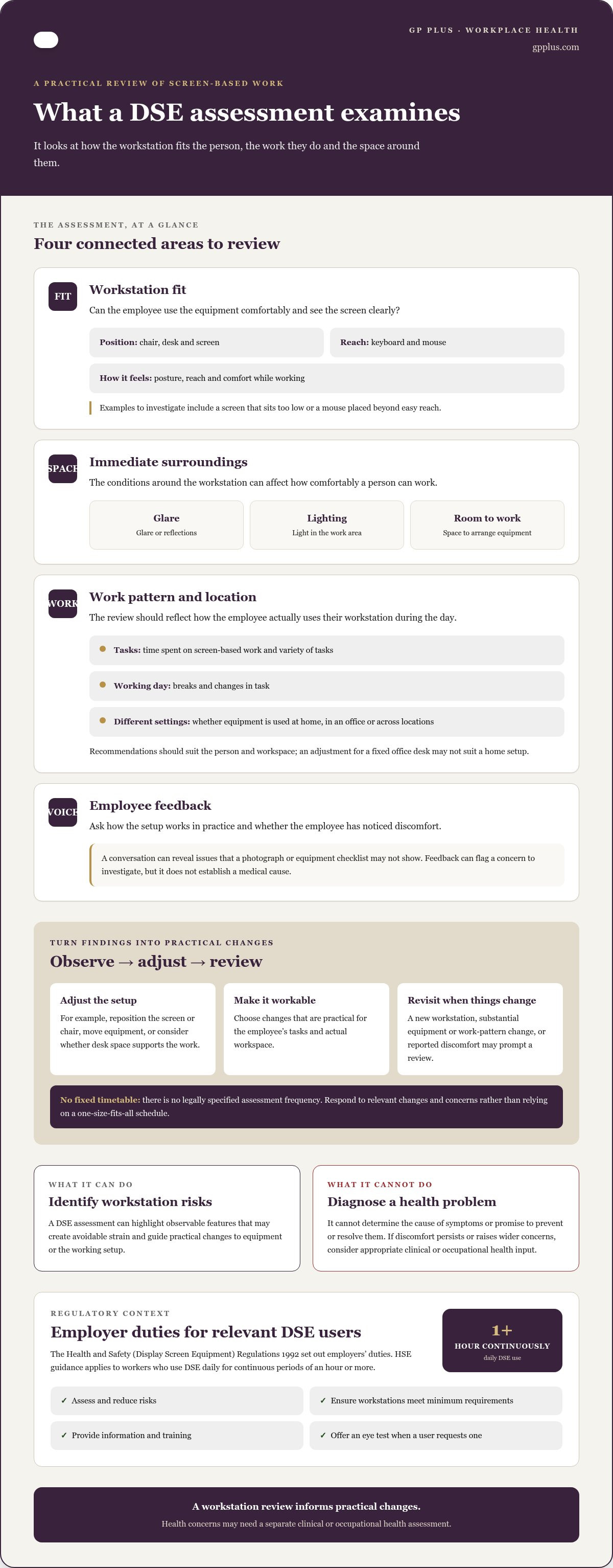
A display screen equipment (DSE) assessment is a structured review of a person’s screen-based work, workstation and immediate surroundings. It identifies risks and practical ways to reduce them. It focuses on how equipment and the working setup are used, rather than diagnosing a medical condition.
The Health and Safety (Display Screen Equipment) Regulations 1992 set out employers’ duties for relevant DSE users. HSE guidance applies to workers who use DSE daily for continuous periods of an hour or more, whether they work in an office, at home or across both. Employers must assess and reduce risks, ensure workstations meet minimum requirements, provide information and training, and offer an eye test when a user requests one. A DSE assessment is distinct from a general medical examination or a corporate health check, which considers wider aspects of health.
Which employees and work situations may benefit from a DSE assessment?
Regular computer-based work can look different from one employee to another. Someone at a fixed office desk may have different needs from a colleague working at a kitchen table, using a laptop between locations or alternating between home and office. An assessment should reflect the person’s actual tasks and setup, rather than assume one arrangement suits everyone.
Needs can also change over time. A new employee or workstation, a substantial change to equipment or work pattern, or a report of discomfort may prompt an assessment or a review of existing findings. There is no legally specified assessment frequency, so employers should respond to relevant changes and concerns instead of relying on a one-size-fits-all timetable.
What a DSE assessment can and cannot tell an employer
An assessment can identify observable features of a workstation that may create avoidable strain, such as a poorly positioned screen, limited working space or equipment that does not suit the user’s tasks. The principles of ergonomics and human factors explain why work should be considered in relation to the person using the equipment and the surrounding environment.
It can guide practical next steps, but it cannot establish the cause of a health problem or provide a medical diagnosis. If an employee reports persistent discomfort or other symptoms, listen carefully and consider whether clinical or occupational health input is appropriate. A clinician can explore health concerns and advise on work-related support; the DSE assessment informs decisions about the workstation itself. Keeping these roles clear helps employers act on observable issues without drawing medical conclusions from workstation findings alone.
What does a display screen equipment assessment examine?
A DSE assessment reviews how a workstation fits the person using it and the tasks they carry out. Checks should reflect the actual setup and work pattern, rather than rely on a generic checklist alone. The Health and Safety Executive’s guidance on the Health and Safety (Display Screen Equipment) Regulations is a useful reference when organising reviews and considering their findings.
How workstation setup and equipment are reviewed
The assessor considers whether the employee can use their equipment comfortably and see the screen clearly. This includes posture, reach and the position of the chair, desk, screen, keyboard and mouse. For example, a screen that sits too low or a mouse placed beyond easy reach may encourage an awkward working position. The review also considers the immediate environment, including glare or reflections, lighting and whether there is enough space to arrange equipment and work comfortably.
Recommendations should be practical and suited to the person and workspace. Depending on the findings, this might mean adjusting the screen or chair, repositioning equipment or considering whether the desk space supports the work. A change that helps at a fixed office desk may not suit a home workspace, so the context matters.
Why work patterns and employee feedback matter
Equipment is only part of the picture. An assessment should explore how the employee uses their workstation during the working day, including time spent on screen-based tasks, task variety, breaks and any discomfort they have noticed. These conversations help explain how the setup works in practice, including issues a photograph or equipment checklist may not reveal.
Breaks and changes in task can be discussed as part of the overall working pattern, but recommendations should reflect the individual’s work rather than impose a rigid routine. If someone uses a laptop in different locations, for example, the review may need to consider how the equipment is positioned in each setting and what adjustments are realistic.
Employee feedback can identify a concern worth investigating, but an assessment cannot promise to prevent or resolve every symptom, or determine its medical cause. If discomfort persists or raises wider health concerns, employers can consider appropriate clinical or occupational health input alongside workstation changes. For support with broader workplace health planning, explore occupational health assessments as a separate, complementary form of support.
DSE assessment, occupational health assessment or corporate health check: what is the difference?
These forms of support answer different questions. A DSE assessment examines a workstation and how it is used; an occupational health assessment considers how an employee’s health relates to their work; a corporate health check offers broader health screening. The right scope depends on the organisation’s aims and the employee’s circumstances. A corporate health check edinburgh employers consider for general screening does not replace a workstation-specific review when screen setup is the concern. The HSE guidance on DSE explains employer responsibilities for assessing and reducing risks.
| Support | Purpose and focus | Questions it may address | Possible follow-up |
|---|---|---|---|
| DSE assessment | Reviews the workstation, equipment and screen-based work. | Is the screen positioned comfortably? Is equipment suitable for the tasks? | Practical changes to the workstation or work setup. |
| Occupational health assessment | Considers the relationship between an employee’s health and their work. | Is a health concern affecting work, or could workplace adjustments help? | Individual recommendations to inform workplace support. |
| Corporate health check | Provides broader screening of an employee’s general health. | Are there health indicators or risks that may benefit from further attention? | Relevant follow-up based on screening findings. |
When a workstation-focused DSE assessment is the relevant starting point
Start with a DSE review when the concern relates to screen-based tasks or the workstation itself. An employee may find the screen difficult to view, equipment awkward to reach, or report discomfort during computer work. These observations do not establish a diagnosis, but they can help identify practical changes to consider, such as repositioning equipment or reviewing the workspace. The assessment remains focused on the work setup.
When occupational health or a corporate health check may add context
If an employee’s health is affecting their work, an occupational health assessment can help explore that relationship and inform workplace support. GP Plus provides occupational health assessments, with longer appointments that allow for thorough investigations and personalised care planning. Read the occupational health assessment guide for more on this support.
A corporate health check offers a different kind of support: broader screening, not an ergonomic inspection or a substitute for reviewing a specific workstation. Health screening can be tailored to individual or corporate requirements, with follow-up considered in light of the findings. For further context, see the proactive health screening guide. These options can complement one another, but each should address the question it is designed to answer.
How employers can respond to DSE assessment findings
An assessment is useful when its findings lead to considered action. Under the Health and Safety (Display Screen Equipment) Regulations 1992, employers must assess and reduce risks for relevant DSE users. A clear follow-up process turns observations into workable changes and keeps the employee involved at each stage.
Turning assessment recommendations into manageable workplace changes
Review the findings with the employee and agree which steps suit their tasks and setup. Adjusting a screen or chair may be straightforward; other recommendations may involve equipment, workspace layout or how work is organised. Record what has been agreed, who is responsible and when progress will be reviewed. Keep the record focused on actions and avoid circulating unnecessary personal health details.
- Review the findings. Separate immediate workstation concerns from recommendations that need discussion or further consideration.
- Agree practical actions. Talk through options with the employee, taking their work pattern and circumstances into account.
- Assign responsibility. Name a person to arrange equipment or workspace changes and record the agreed actions.
- Put changes in place. Check that the adjustment is available and that the employee understands how to use it.
- Revisit the outcome. Ask whether the change is workable and review the setup if concerns remain or circumstances alter.
Keep follow-up proportionate. A brief check-in may be enough for a simple adjustment, while a change in workstation or working arrangements may call for a fuller review. HSE guidance does not set a legally specified frequency for DSE assessments, so employers should respond to relevant changes, including a new workstation, significant changes to a setup or reported discomfort.
Recognising when further health support may be appropriate
Some findings can be addressed through routine workstation adjustments. Persistent discomfort or a health concern affecting someone’s ability to work may call for individual clinical consideration. A DSE review can identify setup issues, but it cannot diagnose a condition or determine its cause.
Occupational health input may help employers understand how health and work relate, and consider recommendations for workplace support. Keep any resulting actions clear and focused on what is needed at work. Broader health screening has a separate purpose and does not replace a workstation review.
For individualised occupational health support, explore occupational health assessments from GP Plus. Longer appointments allow for thorough investigations and personalised care planning.
How GP Plus can support a more considered workplace health plan
Workplace health planning is more useful when each form of support is chosen for the question it can answer. A DSE assessment focuses on the workstation and screen-based work. Occupational health assessments and corporate health screening address different aspects of employee health and can complement DSE findings without replacing a workstation review.
Bringing occupational health and broader screening into workplace planning
If an employee’s health is affecting their work, an occupational health assessment can help explore the relationship between their health and their role. Its purpose differs from a DSE assessment: it considers work-related health questions rather than concentrating on the arrangement of a screen, chair or other workstation equipment. The appropriate assessment depends on the employee’s circumstances and the employer’s question.
Corporate health screening has a broader preventative focus. It gives employees an opportunity to assess aspects of their general health, with screening tailored to individual or corporate requirements. It is not an ergonomic inspection and cannot identify whether a particular workstation needs adjustment. If a DSE assessment identifies a setup concern, that finding still calls for appropriate action on the workstation itself.
Employers can consider different forms of support as part of a wider plan: address workstation findings directly, seek occupational health input where health and work intersect, and use corporate screening for broader employee health assessment. Keeping their purposes clear helps avoid treating one service as a substitute for another.
What a thoughtful next step can look like
Begin by defining the concern. Is the priority to understand an individual employee’s health in relation to their work, or to offer broader health screening across a workforce? Clear aims can shape a more relevant approach. Handle sensitive personal information with care and share it only as appropriate.
GP Plus provides occupational health assessments and health screening for individuals and businesses. Longer appointment times allow space for thorough investigations and personalised care planning. Health screening can be tailored to individual or corporate requirements, with follow-up considered in light of the assessment and its findings.
For employers developing a workplace health plan, match the support to the need and consider how findings will inform appropriate follow-up. Explore GP Plus services to learn more about occupational health and health screening.
Make workplace health support purposeful
A useful DSE assessment is more than a record of workstation details. Its value comes from acting on relevant findings and reviewing whether agreed changes remain suitable. Keep its purpose clear: workstation adjustments address the setup, occupational health assessments explore how health and work relate, and corporate health screening offers a broader view of employee health.
For concerns that call for clinical input, GP Plus provides occupational health assessments and personalised care planning. Longer appointment times allow for thorough investigations, while corporate health screening can be tailored to organisational requirements. The appropriate next step depends on the health question and the employee’s circumstances, not a one-size-fits-all approach.
With the right support, employers can approach workplace health planning with greater clarity and care. Explore GP Plus occupational health and health screening services to consider how these options could support your organisation.
Frequently Asked Questions
What is a display screen equipment assessment?
A DSE assessment reviews how someone uses screen-based equipment and whether their workstation or work habits could benefit from practical changes. It may consider the screen, chair, desk, keyboard, mouse, lighting and available workspace, alongside the employee’s feedback. The aim is to identify relevant risks and suitable improvements, not to diagnose a health condition. Recommendations should reflect the individual’s tasks and circumstances, with follow-up to check whether agreed changes are workable.
Who needs a display screen equipment assessment?
Employers should consider assessment for workers who use display screen equipment daily for continuous periods of an hour or more, as set out in Health and Safety Executive guidance. This can include people working in an office, at home or in a hybrid arrangement. The assessment should reflect the person’s actual tasks, equipment and circumstances. Avoid assuming one workstation arrangement or adjustment will suit everyone.
What happens during a DSE assessment?
A DSE assessment typically reviews the workstation, including equipment positioning, lighting and available space, as well as the employee’s screen-based tasks. The discussion may cover work patterns, breaks, task variety and any discomfort the person has noticed. The purpose is to identify relevant risks, agree practical improvements and decide on suitable follow-up. It is not a medical diagnosis, and an assessment cannot guarantee that symptoms will resolve.
Is a DSE assessment the same as an occupational health assessment?
No. A DSE assessment focuses on screen-based work and the workstation, while an occupational health assessment considers how an employee’s health relates to their work. The latter may help inform individual work-related recommendations; it does not automatically replace a workstation review. The two can complement each other when concerns involve both the setup and an employee’s health. The appropriate support depends on the question the employer needs to address and the individual’s circumstances.
Can a corporate health check replace a DSE assessment?
No. A corporate health check offers broader screening of an individual’s health, whereas a DSE assessment examines screen-based work and workstation factors. If you’re researching a corporate health check edinburgh, keep its purpose distinct from an ergonomic review: screening may contribute to wider employee health planning, but it will not establish whether a particular desk, screen or equipment setup needs changing. Use a workstation-focused assessment to examine those factors.
What should an employer do after a DSE assessment?
Review the findings with the employee, agree suitable actions and assign someone to put them in place. Record the changes and who is responsible, keeping notes focused on workplace actions rather than unnecessary health details. Follow up to check whether adjustments remain practical. Review arrangements if the workstation or work pattern changes, or the employee’s needs develop. If concerns go beyond workstation setup, consider appropriate clinical or occupational health input.
Do DSE assessments apply to employees working from home?
Yes, employers should consider the needs of employees who use display screen equipment at home or in a hybrid working arrangement. The review should take account of the person’s actual workspace, equipment, tasks and working habits, since home setups can differ considerably. An assessment may identify practical issues with lighting, available space or equipment positioning. For current information about responsibilities and assessment requirements, refer to the Health and Safety Executive’s DSE guidance.


